

Caddebet App and Mobile Version
The differences between the Android APK, the home-screen PWA and the mobile browser, step-by-step setup and fixes for common problems.
18+ · Gamble responsibly
There are three ways to use Caddebet on a phone: the mobile browser, a PWA shortcut added to the home screen, and an APK file installed directly on Android. Many players search for the Caddebet app first, fail to find it in a store and assume the site is broken. In fact, the platform does not list a native app in Google Play or the App Store, so the official options are the browser, the PWA and the APK. This guide explains each, with a safe order of steps.
The text is meant for readers aged 18 and over. Button names and menus may change over time, and the screens inside the account area have the final say. If betting starts to feel out of control, the National Gambling Helpline on 0808 8020 133 and GambleAware offer free support. Last updated: 12 November 2026.
Do You Need the Caddebet App?
Most players do not need an installed file at all. The mobile site is responsive, so menus, the cashier, live chat and streams work in any current browser. An installed shortcut helps in three cases: quick access with one tap, a full-screen view without the browser bar, and a stable entry point when the address changes. For those reasons the Caddebet download question is really a question about convenience, not about missing features.
| Option | Install needed | Best for | Main drawback |
|---|---|---|---|
| Mobile browser | No | Occasional use | Browser bar takes space |
| PWA shortcut | No file | iPhone and Android daily use | Needs a fresh shortcut if the address changes |
| Android APK | Yes, from the official site | Android users who want a standalone icon | Security care required |
The rule of thumb is simple: start with the PWA, because it needs no file and no extra permissions. Consider the APK only on Android and only from the verified official address; a Caddebet app download from anywhere else is not official. A Caddebet mobile account is the same account as on the desktop site, with the same balance and history.
Mobile Browser vs PWA App
A progressive web app is a website that can be pinned to the home screen. It opens in its own window, remembers the language and loads the latest version every time, so there is nothing to update by hand. The mobile browser offers the same content, but tabs, bookmarks and the address bar stay visible, which some users find safer because the full domain can be seen at all times.
Notifications from a PWA are limited, and on iPhone they work only when the shortcut is added through Safari. Cache can sometimes show an old page; closing and reopening the shortcut, or clearing site data, fixes this. If the address has changed, the old shortcut will not follow it, and a new one has to be added from the verified domain. That is why many players keep both a shortcut and a bookmark.
Battery use is the same in both modes. Video streams and live tables are the heavy items, not the shortcut itself. Switching off auto-play in the settings and closing unused tabs keeps both memory and battery under control.
Caddebet Android Installation Steps
On Android phones, the Caddebet APK route works as follows. The file must come only from the official address announced on the verified Telegram channel or X account. Search results, forum links and files shared in private chats are not sources. Android will ask for permission to install from the browser, and that permission should be removed again after the installation.
- 01
Verify the address
Compare the domain with the official announcement letter by letter and check https.
- 02
Download the APK
Use the download button on the verified site only; note the file size shown.
- 03
Allow the installation
Enable installs from this browser once, then switch the permission off again.
- 04
Open and log in
Launch the icon, log in and test one game and one live match.
If a Caddebet APK download stops halfway or the installer reports a problem, the usual causes are a partial download, low storage or an older Android version. Deleting the file and downloading again from the same verified page is the standard fix. Never install a file that arrives through a messenger, even if it claims to be an update.
After installation the file can be deleted from the Downloads folder. Updates arrive either inside the app or as a new file on the official site; the second case needs the same verification again.
Caddebet on iOS (iPhone) Guide
Caddebet iOS use works through Safari and the home-screen shortcut, because the platform has no App Store listing. The shortcut behaves like an app and keeps the session inside its own window. Other browsers on the iPhone can open the site, but the Add to Home Screen option is most reliable in Safari.
- 01
Open Safari
Load the verified current address in Safari.
- 02
Tap Share
Use the Share icon at the bottom or top of the screen.
- 03
Add to Home Screen
Choose the option, name the icon and confirm.
- 04
Check the icon
Open it, log in and confirm that the cashier and live chat load.
If an App Store page claims to be Caddebet, treat it with suspicion. Fake apps use the brand name to collect logins and payment details. A genuine setup never asks for an Apple ID password, and a profile or certificate installation request is a red flag.
APK Safety and Permissions
A downloaded Caddebet APK is the riskiest part of mobile betting, so the checks matter. The source must be the verified official domain, the connection must use https, and the file should not request permissions unrelated to its job. A betting app has no reason to read contacts, SMS or call logs.
- Download only from the verified official address.
- Refuse access to contacts, SMS and call logs.
- Turn the unknown-source permission off after installing.
- Keep Android and the browser updated.
- Use a screen lock and never save passwords in shared devices.
Security software on the phone can scan the file before opening it. If the antivirus flags the APK or the phone shows a warning about a changed signature, stop and ask live chat before continuing. A file with a different name or size than announced is also a reason to delete it.
Players should not use modified or “premium” versions offered on social media. These carry malware more often than not, and no official feature requires a modified file.
Fast Deposits from Your Phone
The cashier on mobile offers the same methods as on desktop: bank transfer, cards, e-wallets and cryptocurrencies. The deposit amount is chosen against the minimum and maximum shown on the screen; the general minimum is often €5 to €10, and the welcome package may ask for €10 or more. Choosing the Caddebet app download route does not change how fast a deposit lands; the speed depends on the payment method.
A Caddebet download adds no payment methods and no speed, since the cashier is identical everywhere. After paying, the balance normally updates within minutes. If it does not, refresh the screen first, then contact live chat with the transaction time and reference number. For crypto, wait for network confirmation before asking, since the platform cannot speed up the blockchain.
Mobile payments carry one extra risk: tapping quickly can enter the wrong amount. The confirmation screen should always be read once before pressing the final button. Setting a deposit limit before the first payment helps keep the amount reasonable.
Mobile Interface Review
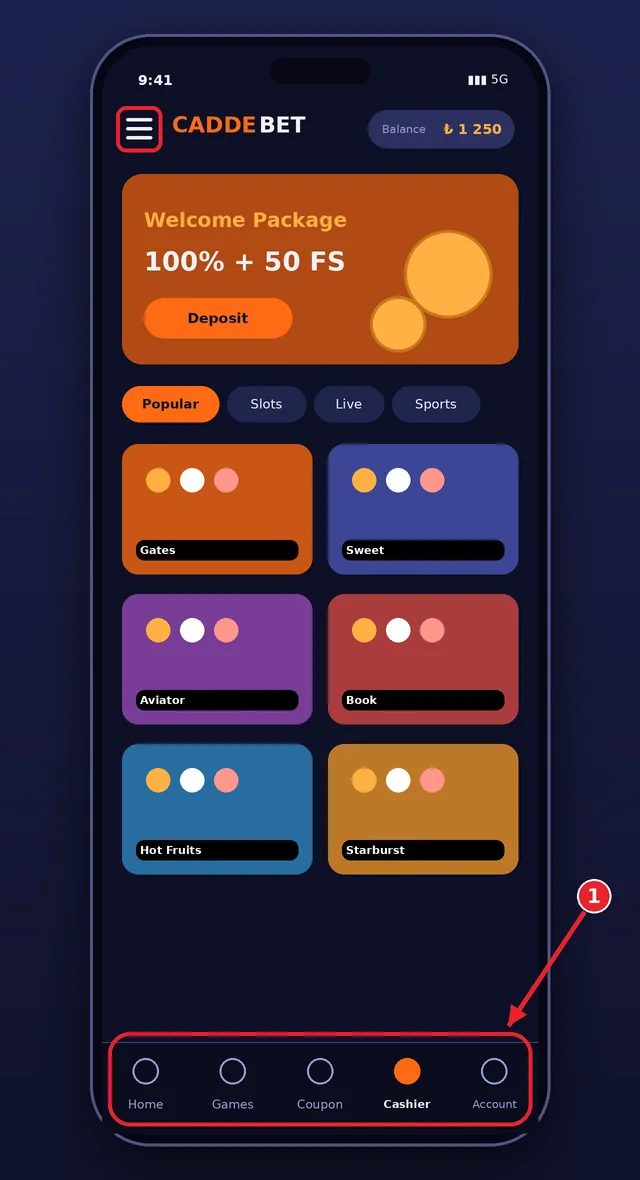
The phone screen shows the logo and balance at the top, category tabs below them and game cards underneath. The bottom menu gives one-tap access to home, games, bet slip, cashier and account. The red frame marks that menu, which is the part most players use all the time.
The search bar filters by game name or provider. What defines the mobile experience is legibility and button size; on a small screen the bet slip summary should be read once more before the stake is confirmed, to avoid mistaken taps.
Slots and live tables are the same as in the desktop catalogue, though some older or heavy games may open slowly on low-spec devices. If a game window freezes, close the tab and reopen it; if a round was in progress, check the result in the history before playing again.
Live Betting on Mobile
The Caddebet mobile in-play section works on the phone with the same markets as the desktop site. Odds update continuously and the slip shows the latest price before confirmation. Streams open inside the event page, and landscape mode enlarges the picture. The bet slip stays accessible as a floating button, so a wager can be placed without leaving the video.
Mobile live betting has a delay risk: the picture on the phone may trail the real match by several seconds, and the odds already reflect events the viewer has not seen. Decisions should therefore rest on the price on the slip and not on the moment seen on screen.
- Check the final odds on the slip before confirming.
- Use Wi-Fi for streams where possible.
- Limit the number of live bets per match.
- Close the stream when not watching to save data.
Mobile Data and Battery Use
Browsing menus and the sportsbook uses little data. Streams and live tables are the main consumers, and an hour of video can use several hundred megabytes. On Caddebet Android installs, a data saver mode and lower stream quality reduce the load, and Wi-Fi is the preferred choice for longer sessions.
Battery drain rises with screen brightness, video and background tabs. Dimming the screen, closing other apps and turning off auto-play in the settings keep consumption down. A phone left in a hot place may throttle and make streams stutter, so a break often solves a laggy table.
Players on limited data plans should check their remaining allowance before opening a stream. Mobile networks in crowded places can also cause short drops, which is a further reason to avoid placing large bets while on the move.
Mobile Troubleshooting
Most mobile problems have simple causes. A page that does not open usually means the address has changed or the network blocks it; the verified channels give the new address. A shortcut that shows an old version needs the cache cleared. A frozen game needs a tab restart. A failed login after a password change needs a clean cache and a fresh start.
- Page will not load: check the verified channel for a new address and try another network.
- Old version shown: clear site data and reopen the shortcut.
- Video stutters: lower the quality or move to Wi-Fi.
- Login rejected: use the reset option and check keyboard layout and caps lock.
- Installer error on Android: delete the file and download it again from the verified page.
On Caddebet iOS, a shortcut that stops working is best removed and added again from Safari. If nothing works, live chat can be reached from another device or network, and the answer will include the next step. The current address page explains how to verify the domain, and the login page covers account problems.
FAQ
Is there a Caddebet app?
There is no native Caddebet app in Google Play or the App Store. Mobile use works through the browser, a PWA shortcut on the home screen, or an Android APK offered on the official site. Verify the address through the official channels before downloading anything.
Where can I find the Caddebet APK download?
Only from the official site at the address announced on the verified Telegram channel or X account. Third-party sites, forums and messenger files are not safe sources. Check https, compare the domain letter by letter and refuse permissions unrelated to the app.
How do I use Caddebet on iPhone?
Open the verified address in Safari, tap Share, choose Add to Home Screen and confirm. The icon then opens the site in its own window. There is no App Store version, so any store listing using the brand name should be treated with suspicion.
Are all games available on mobile?
The mobile catalogue matches the desktop one: slots, live tables and sports betting. A few older or heavy titles may load slowly on weak devices. If a game fails to open, restart the tab, switch to Wi-Fi or ask live chat for help.
In short, Caddebet on mobile works best as a PWA shortcut, with the Android APK as an optional extra taken only from the verified official address. The same account, balance and support are available everywhere, so the choice is about convenience and security habits, not about features. Keep permissions minimal, update the phone and verify the domain every time the address changes.
Mobile play makes betting easy to start and easy to overdo. Set deposit and time limits first, and use GambleAware or the National Gambling Helpline if control slips. More guidance is on the responsible gaming page.
In short, the right address, carefully read terms and limits set in advance are the foundation of a smooth experience. Details can change, so before any important decision it is enough to confirm through the official channels and, when needed, to write to live chat.